I talk about video games a lot, and several people have asked why I chose Xbox over all the other options.
Console vs PC
In my teens and early 20s, I played on PC, but switched to consoles by my late 20s. I don’t see myself going back.
- I do a lot of couch co-op gaming. I’ve played many games (Borderlands series, It Takes Two, Morkredd, Gear of War series, A Way Out, Diablo series, Nobody Saves the World, on and on) with several friends. PC support for couch co-op isn’t as common as consoles.
- Consoles require less time spent on upkeep/troubleshooting. I’ve owned consoles since the original Nintendo Entertainment System, and things like driver conflicts and game crashes have been quite rare. They were far more common during my time on PC. Based on reading online and friends’ experiences, that is still the case.
- Consoles have a better balance of hardware cost and useful lifetime. Starting from zero, you can get a flagship console (including controller) for $500 that you can immediately plug into any TV and start playing. Pre-built gaming PCs seem to start in the $650 range, and ones with good specs seem to be $1,500+. That’s before a keyboard, mouse, monitor, desk, chair, speakers, and many other common peripherals/accessories. Extensive console optimization means even lesser hardware can provide good performance for years.
- Consoles natively work with my home theater. I’ve spent a lot of time and money on setting up a nice home theater system, and a console easily plugs right in and fits on the shelves under my TV. I can (and have) run an HTPC, but many PC games don’t fully support a controller, and I don’t enjoy playing with keyboard and mouse from my couch.
- Consoles have simple game purchases/libraries. I buy games from the Xbox store. That’s it. PC has many launchers (Steam, Epic, GOG Galaxy, EA/Origin, etc.) with their own quirks that can have exclusivity agreements with developers, so you have to use one if you want to play a specific game at launch.
So console works much better for me. Now to choose between Microsoft, Nintendo, and Sony.
Controller Ergonomics
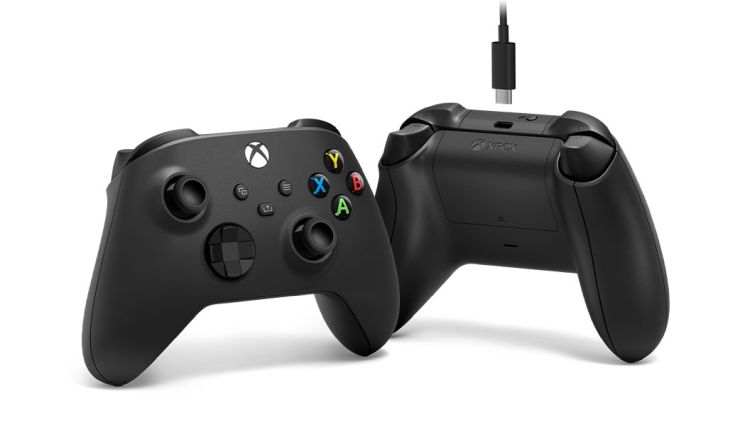
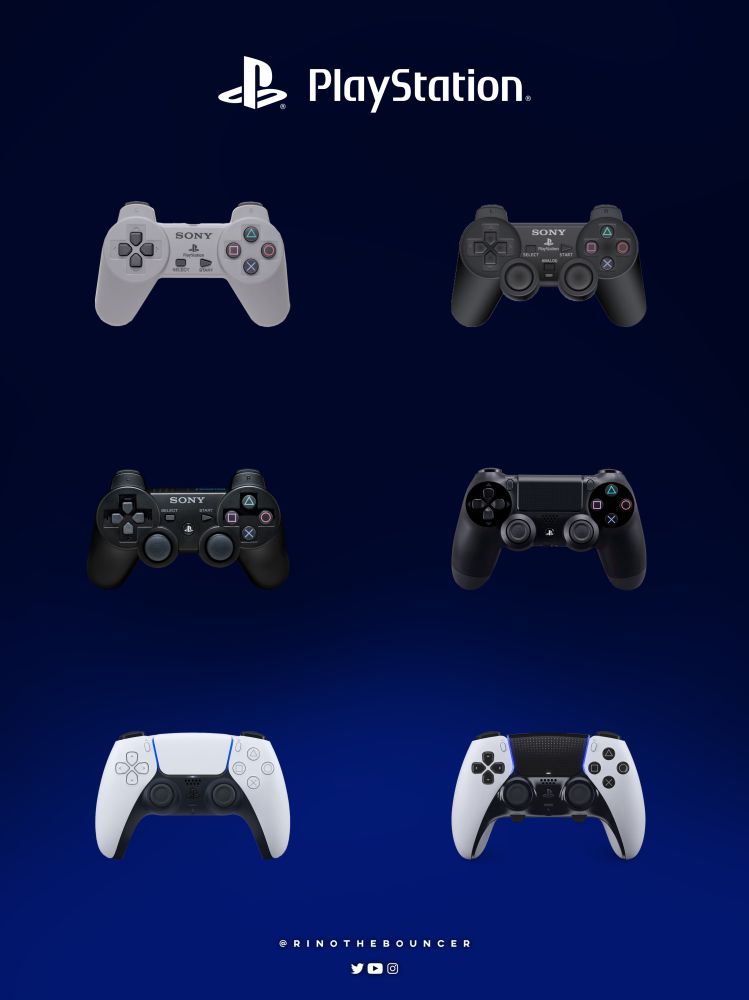
When I was coming back after a break from gaming, the major competitors were the Xbox 360 and the PlayStation 3. I already knew I liked the Xbox controller, so I borrowed a PS3 from a coworker, and the controller just didn’t fit my hand nearly as well. It wasn’t awful (my hands weren’t cramping or anything), but it was noticeably less comfortable.
Thankfully, this isn’t as much of an issue for PlayStation players anymore since their controllers are shaped much more like Xbox controllers (AKA, ergonomic) than the traditional design starting with the PS5.
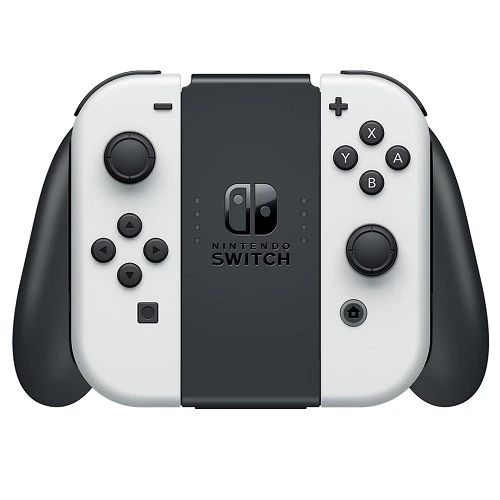
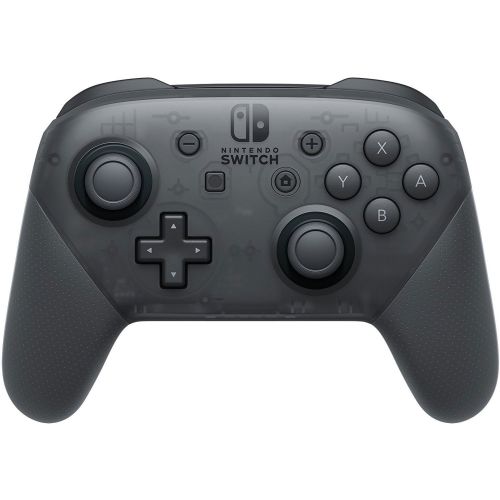
I recently borrowed a Switch from a friend to try Zelda for the first time. I played for a few hours with Joy Cons using the grip included with the console, and it was a barrier to me enjoying the game. Thankfully, another friend wasn’t using his Pro controller (which is a near-clone of Xbox), so he let me borrow that, and it was much better. Unfortunately for anyone starting out, the Pro controller is $50-70, depending on whether you can find it on sale.
Backward Compatibility
Back in 2015, Microsoft announced an Xbox initiative called Backward Compatibility. They’d released the Xbox One in 2013, and like most other consoles, many games released for previous hardware weren’t guaranteed to work on the One. However, after listening to player feedback, Microsoft started Backward Compatibility. This provides officially-supported emulators of previous consoles on all new Xboxes, which means that many games released for those previous consoles play fine on the new hardware. Microsoft also had dedicated engineers/developers to help the owners of those games certify them.
The end result of this is that once you buy an Xbox game (especially a digital version), there’s a very good chance you’ll be able to play it on all future versions of Xbox hardware. A specific example: Fallout: New Vegas is probably my favorite game of all time. Here’s my journey with that game on Xbox:
- Purchased a physical disc of the main game in early 2012
- Used that physical disc to do a probably 200+ hour playthrough from March to December of 2012 on my Xbox 360
- At some point during a promo, I traded in the disc to GameStop for cash.
- In October of 2020, I saw all the DLC was on sale in the Xbox store (4 narrative packs, 2 bonus item packs), so I purchased the digital versions of those as well as the main game.
- When I installed the main game in December of 2025, all my saves were automatically downloaded from the Xbox servers, so I could have restarted where I left off back in 2012.
- However, I wanted the whole experience again. From early December of 2024 to late January of 2025, I played the entire original game (which was released in 2010) and all DLCs on my Xbox Series X.
I will be able to do the same thing on whatever the next version of Xbox is. Now, I did have to purchase the main game twice in this scenario, but if I would have purchased the digital version back in 2012, I wouldn’t have had to repurchase in 2024.
After MS announced their program, Sony started its own backward compatibility efforts, and as a result, the PS5 can play nearly all PS4 games. However, there is no officially supported way to play PS3 or older games on modern hardware.
Nintendo essentially doesn’t support backward compatibility right now. This makes a bit more sense for them considering the controllers for their previous consoles had fundamentally different designs, but given the company’s history of taking opportunities to sell hardware accessories at…premium prices, it seems like selling a wireless N64 controller for the Switch is right up their alley. But players with favorite pre-Switch games have to hope for re-releases on the Switch, then they’re stuck paying $40+ again for the newer version. However, hope is on the horizon: Nintendo has announced they’re going to start supporting backward compatibility on the Switch 2, but only for other Switch games. Any games purchased on previous console versions will still be unplayable.
I very rarely replay games, so some people might think backward compatibility isn’t a big feature for me. But it’s huge for one reason: stuff I missed when it was originally released. In my example above, I was able to play all the DLC for my favorite game over a decade after it was launched, and it has also let me play games from previous generations that I didn’t know about or didn’t have time to play back then: Far Cry 4 (2014), Deus Ex: Mankind Divided (2016), Portal 2 (2011), Left 4 Dead 2 (2009), on and on. And all these games are cheap: I got all the ones listed for <$10 apiece during routine sales. Someone just starting out with gaming could do a lot worse than “best games of xbox <360/one> generation” and buying digital versions of backward compatibility classics during weekly sales.
Hardware Tiers
The current generation of Xbox consoles has had two tiers since initial launch (prices are MSRP at the time of writing):
- Series X
- Flagship model
- Disc drive
- Capable of 4K resolution
- Prices
- 1 TB discless: $450
- 1TB disc: $500
- 2TB disc: $600
- Series S
- Budget model
- No disc drive (can only purchase digital versions of games)
- 1080p resolution
- Prices
- 512GB: $299
- 1TB: $350
For a long time, there was basically only one hardware configuration per platform per generation. In the One/PS4 generations, both Microsoft and Sony started doing mid-generation refreshes, including discless versions. These usually had the same specs as the normal versions, but were $50 or so cheaper because of the lack of disc drive.
With the Series generation, Microsoft introduced true differentiation: the Series S is not only discless, but it also less powerful overall and has a smaller physical footprint. It is squarely aimed at more casual gamers who don’t need the full processing power of the Series X and want to save at least $100.
When I asked friends who bought Switches why they did so, price was always one of the top two reasons. You basically couldn’t get a new-in-box Xbox One or PS4 setup for less than $450, whereas a Switch launched at $300. It’s no coincidence that the Series S launched at $300. And during the holiday season, it’s normal to see Series S models going for $225-250.
I like the move of making the Xbox tent bigger. Not only is it a good ideological move to acknowledge there are different types of gamers, but on a personal level, it’s much easier for me to recommend the platform to people when it has options that are priced as low or lower than all other competitors.
Nintendo released a mid-generation refresh of the Switch (OLED screen) that is now priced at $350. Sony’s “budget” offering is is a PS5 Slim Digital Edition at $450, which is the same “$50 discount for no disc drive” methodology of the previous generation. So among the current offerings, the Series S at $300 is actually the cheapest.
Game Pass
Back in 2017, Microsoft announced Game Pass, a new service that many people at the time described as “Netflix for gaming.” For a monthly fee, a person could play any game in the library as if they owned it. They would continue to have access to all those games as long as they maintained their subscription.
The program has gone through a few iterations, including splitting into multiple tiers and taking over for the now-retired Gold service. Here are the current tiers for consoles:
- Game Pass Ultimate
- $20/mo
- Full library (currently 484 games)
- Enables console multiplayer functionality
- Ability to play library games as soon as they’re released
- Remote Play functionality without console (more on this later)
- Game Pass Standard
- $15/mo
- Full library minus EA Play games
- Enables console multiplayer functionality
- Must wait a while to play library games as they’re released
- Game Pass Core
- $10/mo
- Library of 25 rotating games
- Enables console multiplayer functionality
Ultimate and Standard are great options for new gamers who want to try a bunch of different genres without spending a lot of money. And speaking of money: it’s pretty routine for 3-Month Game Pass Ultimate codes to be go on sale on Eneba and CDKeys for $25-27 after fees, making the per-month cost $8-9 instead of the normal $20. I personally haven’t seen any discounts on Standard or Core. You can stack up to 36 months of GPU. Just make sure you apply the codes as soon as you purchase them.
PlayStation finally released similar game library model as part of their PlayStation Plus subscription in June of 2022. Nintendo does not have comparable service, and I haven’t read of them even considering it.
Remote Play
I don’t personally use this feature, but it’s worth mentioning for people who like handheld gaming.
The idea is you use some sort of mobile device (like a phone or tablet) as a “thin client,” meaning it just takes inputs and displays the game while something else does the heavy lifting of actually running the game. Accessories abound, from Switch-esque side handles for your phone to mounts that put your phone on an Xbox controller to kits that include an Amazon Fire stick and controller so you can play on your TV. Or buy a controller and use a smart TV or streaming device you already own.
Worth noting:
– The Xbox app is available in the Apple store, so you can stream games to your iPhone and iPad.
– The latency/responsiveness of the game will depend on the network connection between the host and your mobile device
– Backward compatible games from the original Xbox and 360 are not eligible for Remote Play.
There are two main flavors, with the difference being what’s actually running the games:
Stream from Console
If you own any One or Series console, it can act as a host for Remote Play, both locally (on the same home network as the console) and remotely (away from home). This is basic functionality of the console; it doesn’t require a subscription to any service. Useful for those who want the option to play in both the living room and in bed.
You can use the same controller with both your console and phone/tablet. There’s a button at the top of the controller that switches quickly between a console and a Bluetooth device.
Stream from Xbox Cloud Gaming
The game is played on the Xbox Cloud Gaming servers and streamed to your mobile device. The catch here is that you must be subscribed to Game Pass Ultimate, and the functionality is limited to games in that library.
This is by far the cheapest method of trying the Xbox platform:
– 3-Month Game Pass Ultimate code from Eneba: $27
– Series controller: $45
– Install the Xbox app on a phone or tablet you already have
– Total cost for three months of gaming: $72 (about the price of one AAA game at launch)
PlayStation has a very similar service named PS Remote Play, though it does require a console to work (no cloud gaming). Nintendo doesn’t have a comparable service since the Switch is already mobile/handheld.
Microsoft Rewards
Microsoft/Xbox has had some sort of rewards program since at least 2014. The current version allows users to earn points in a variety of ways:
- Click through daily links on the main page
- Perform daily Bing searches on both a computer and mobile device
- Perform targeted Bing searches about once a week
- Launch Game Pass games every day on both console and PC
With a console, computer, mobile device, and Game Pass subscription, it normally takes me 8-10 minutes a day to complete the tasks. That effort nets me 16-17K points a month, which redeems for about $20 in Xbox store credit. I have paid for all my non-Game Pass games since 2019 with Microsoft Rewards points, and I currently have a little over 420K in the bank, which is worth just over $440 of store credit.
Worth noting: even if you don’t play games, the program allows you to redeem points for gift cards from Amazon, Starbucks, Target, Walmart, and other major retailers. More details and instructions can be found on the Reddit sub.
Neither PlayStation nor Nintendo have a comparable rewards program.
Little Things
- Xbox and PlayStation have Achievements and Trophies (respectively) to note milestones and completed tasks in games. Nintendo does not have a comparable feature.
- Game prices for newly-released major games are similar on all platforms ($60-70). I look around at deal sites almost every day, and this seems to be the way of things for older games;
- PC is the least expensive
- PlayStation and Xbox are roughly the same
- Nintendo is the most expensive by a decent margin
- It’s pretty easy to find 5-10% discounted Xbox gift cards, and Costco has traditionally done 20% off a handful of times a year. This can be used to purchase games or hardware from the Microsoft/Xbox stores.
- Starting with the Series generation, Xbox consoles have a feature called Quick Resume. This allows several games to stay in a suspended state when “closed” and relaunch much faster than a standard startup (normally 3-5 seconds). Neither PlayStation nor Nintendo has a similar feature.
- I have never personally had an Xbox controller exhibit persistent joystick drift (knock on wood). A couch co-op partner experienced some slight left joystick drift on a controller that probably had 2,000+ hours on it, but it was just a couple sessions of a specific game. The behavior has not returned. However, several of my friends have experienced Switch JoyCon drift, and most have had to replace their controllers.
Final Thoughts
If I had to give a single reason for thinking Xbox is the best gaming platform, it would have to be that they’re the most gamer-friendly. They have multiple hardware pricing tiers to cater to different gamer needs, they are actively enabling play on a wider variety of devices (including another platform’s consoles), they provide a way for players to pay for at least a part of their expenses via Microsoft Rewards, they’re leading the way on game library subscriptions and cloud gaming on all devices, they’re introducing basic quality of life improvements like Quick Resume, on and on.
PlayStation is most similar to Xbox, but they seem to be clinging to the walled garden model. They have actively resisted collaborations with Xbox and Nintendo.. They resisted adding gamer-positive features and services like a game library subscription and backward compatibility until they were essentially forced to do it by Xbox raising the bar. They stubbornly stuck to an outdated controller shape until the PS5. They seem to be content to milk their (admittedly great) exclusives like God of War, Horizon, The Last of Us, Uncharted, Ghost of Tsushima, and many more for all they’re worth and do everything they can to force people onto their proprietary hardware. This has been the default model in the video game industry since the ’80s.
Nintendo seems to be ideologically similar to Sony, but is more unapologetic about it. They have no modern hardware option for gamers who want good graphics, they keep the prices of their games artificially high using tactics that have been around since the NES cart days, they don’t offer basic features like achievements/trophies that are standard on all other platforms, and their controller quality control seems to be the worst in the industry. But they have Mario and Zelda, they have been truly innovative with motion-based controls since the Wii, they offer the only mobile-first console, and until recently, they were the least expensive hardware option.
I hold no ill will toward anyone who chooses a different platform. I have multiple friends for whom it’s as simple as “I’ve been playing with the same people since college, and they’re all here.” But many casual gamers who got in during COVID lockdowns are nearing the end of their first console generation, and I’m encouraging them to take a look around to make sure they’re on the platform that offers them the best overall experience and value.


Leave a Reply